How To Download National ID Philippine?
If you’re trying to get a digital copy of your philsys ID, you’re likely looking for the PSA PhilID or its downloadable PDF version. Many people need this when their physical card is delayed, misplaced, damaged, or when they simply want a convenient file for online or face-to-face transactions. This guide on How To Download National ID explains the legal requirements, the technical steps you must follow, how to ensure institutions accept the digital file, and the common issues users may encounter along the way.
How to Download Your National ID Digital Copy Online?
You can now easily download your Digital ID through the official national id.gov.ph platform or PhilSys portal.
Follow these verified steps:
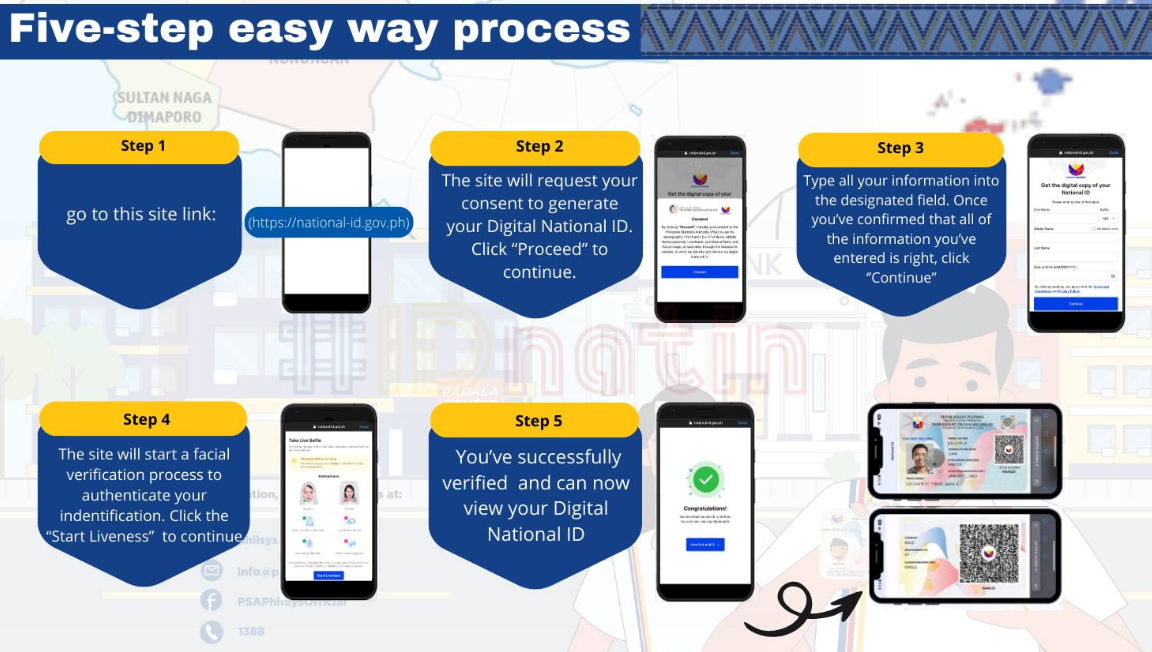
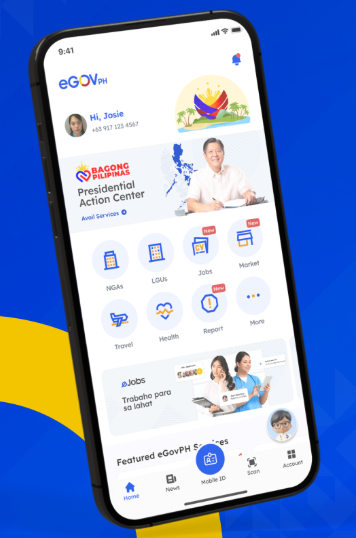
Step 1. Install the eGovPH App
Download the national id.gov.ph from the Google Play Store or Apple App Store. This app securely links your PhilSys ID and other government IDs.
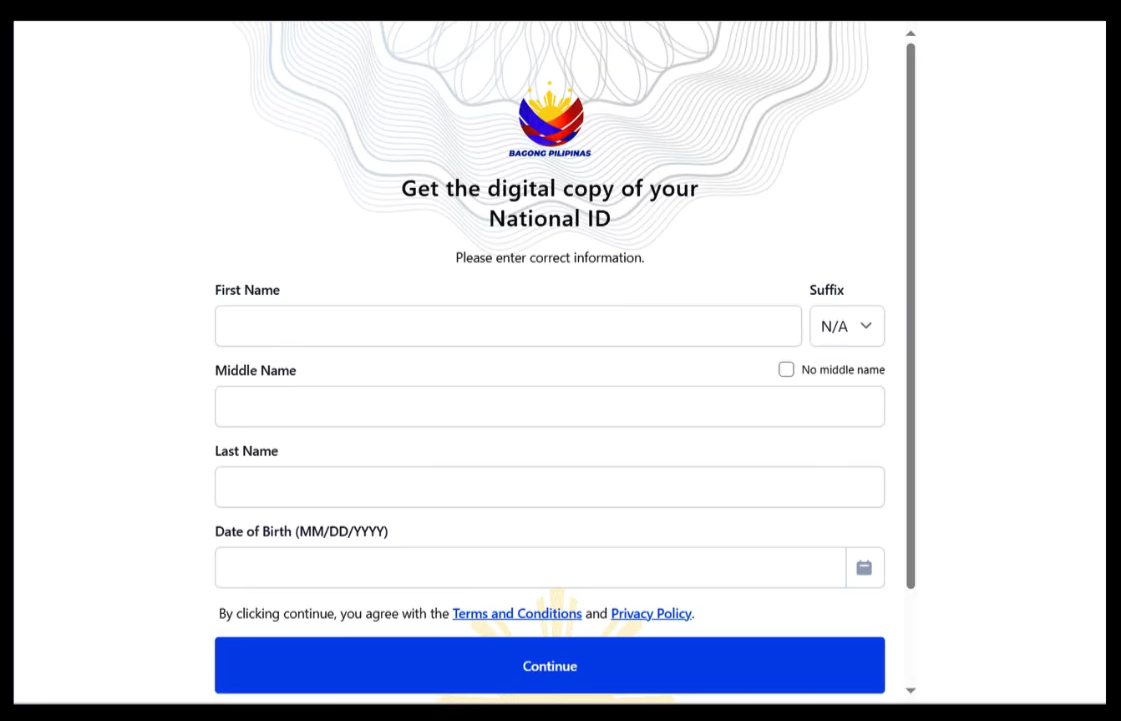
Step 2. Enter Your Information
Open the app and select “National ID” from the menu. Enter your PhilSys Number (PSN) or Transaction Reference Number (TRN) from your registration slip.
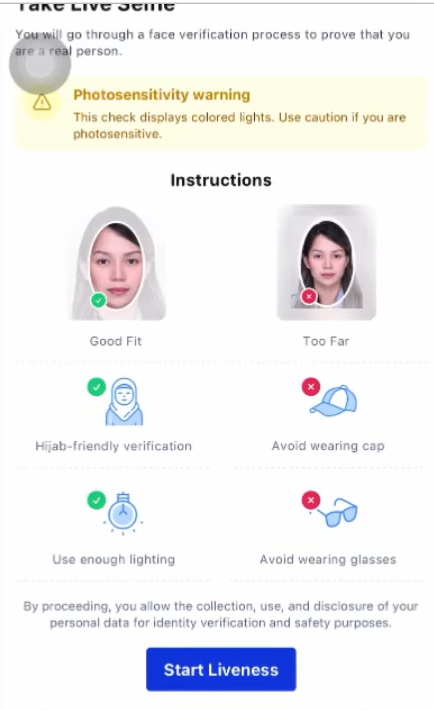
Step 3. Complete Facial Liveness Verification
The app will perform facial liveness verification to confirm your identity. Ensure good lighting and remove accessories for a successful scan.
Step 4. Download Your philsys ID Digital Copy
Once verified, click “View Phil ID”. You can now download your digital phil ID copy (PDF) — also known as ePhilID.
For security, protect your file with a password (e.g., your birthdate MMDDYYYY).
Common Problems and Solutions
| Problem | Solution |
|---|---|
| Facial Recognition Failure | Try again in a well-lit area, ensure no glasses or masks. |
| Lost Transaction Slip / TRN | Visit your nearest PhilSys Registration Center or PSA office. |
| Expired OTP or Login Issues | Re-open the eGovPH App and request a new verification code. |
Uses of the Phil ID
It can be used in both digital and physical form for:
- Opening bank accounts and e-wallets (GCash, Maya)
- Applying for passports, NBI, or government clearances
- Accessing SSS, PhilHealth, and Pag-IBIG services
- Voter registration and social benefit programs
- SIM registration and KYC requirements
- Local and international travel verification
Copy of your ID ensures instant identity verification through mobile access, secure, fast, and convenient.
Download ePhilID via Alternative PSA Channels
If the online portal does not work, PSA provides other official ways to receive or print your ePhilID.
Option 1 – Walk-In Printing at PhilSys Registration Centers
You can visit the nearest Land Registration Authority, mall-based PhilSys booth, or temporary registration site. They can print a secure version of your ePhilID onsite.
Requirements:
Your TRN or PSA-issued reference number
Government-issued ID (if available)
Option 2 – PhilSys Post Office Printing (PHLPost)
Some municipalities provide printing services through PHLPost branches.
Option 3 – Barangay Satellite Booths
Local LGUs regularly conduct mass ePhilID printing days. These events allow thousands of residents to print their digital IDs for free.
FAQ’s
What if I lost my transaction slip for the National ID?
Visit any PhilSys registration center to retrieve your TRN through identity verification.
Why is the National ID download not available for me?
Your record may not be included yet in PSA’s release batch, or there may be demographic mismatches or system issues.
Can I use the downloaded ePhilID for bank transactions?
Yes. Banks in the Philippines accept the ePhilID as an official valid ID for account opening and verification.
Is the digital National ID as valid as the physical card?
Yes. PSA states that the ePhilID is legally equivalent to the physical PhilID card.
Can I print the National ID at home?
Yes. You can print it on A4 paper in colored or black and white, as long as the QR code is clear.
How do I verify if the downloadable National ID is valid?
You can scan the QR code using the PhilSys Check verification portal for authenticity.
Downloading your National ID in the Philippines is the fastest way to get a valid, government-issued identification without waiting months for the physical card. If your record is already released, the process takes only a few minutes.
If not, you can use alternative methods like walk-in printing at PhilSys centers.
Stay patient, keep your TRN secure, and check the portal regularly so you can access your digital ID as soon as it becomes available.